How High Should a Standing Desk Monitor Be?
Set the monitor so the top third of the screen sits at eye level when you stand tall and look straight ahead. The center of the screen usually lands 2–4 in below your eye line, with the screen about an arm's length away.
On this page (9 sections)
- How high should a standing desk monitor be?
- How do you measure the right height for your eyes?
- What does the desk height have to do with monitor height?
- How do you set the monitor height with a stand or arm?
- How do you keep the height right when you sit and stand?
- What about a laptop on a standing desk?
- How long should you stand once the screen is set?
- What are the common monitor height mistakes?
- What's the decision rule for monitor height?
The short answer: set the monitor so the top third of the screen sits at eye level when you stand tall and look straight ahead. The center of the screen usually lands 2–4 in below your eye line, with the screen about an arm's length from your face.
That one rule settles most of the "how high should standing desk monitor be" question. The rest is measuring your own eye height, matching it to your desk's travel, and resetting the screen when you sit.
How high should a standing desk monitor be?
Put the top edge of the screen at or just below eye level, measured while you stand in your normal working posture. For most adults that means the screen center sits around 48–54 in off the floor, though your own eye height decides the number.
Your gaze should land on the upper part of the screen. The bottom rows sit lower, so your eyes travel down slightly without your chin dropping toward your chest.
The screen also needs distance. Start at about 20–30 in, roughly an arm's length, and move it closer if text feels small.
Monitor height and desk height are two separate settings. If the desk itself is wrong, the screen will never feel right, so check what height should a standing desk be first and lock that in before you adjust the monitor.
How do you measure the right height for your eyes?
Measure your standing eye height, then place the screen top a touch below it. The steps take a minute with a tape measure and a wall or a helper.
- Stand at the desk with your shoulders relaxed and your feet flat.
- Look straight ahead at a point on the wall and have someone mark it, or use a mirror.
- Measure from the floor to that mark. That's your standing eye line.
- Subtract about 0–1 in to set the top edge of the screen.
- Measure from the desk surface up to the screen top and note the gap.
Write both numbers down. The floor-to-eye figure tells you what your desk and monitor stand must reach together.
The desk-surface figure is the one you repeat every time you raise the screen.
If you wear glasses or bifocals, sit and stand with them on. Progressive lenses can push your natural gaze lower, so you may want the screen slightly lower than the plain measurement suggests.
What does the desk height have to do with monitor height?
Your desk height sets the base the monitor sits on, so a low desk pushes the screen down with it. A standing desk needs to reach your standing elbow height before the monitor can land at eye level.
Most sit-stand desks top out somewhere in the high 40s in inches. If you're tall, that ceiling can leave your screen a few inches too low even at full height.
This is where a monitor arm earns its place. An arm raises the screen above the desk without changing the desk's position, so you can fix monitor height and desk height separately.
It also frees desk space underneath.
Our guide to how much does a standing desk weigh is useful if you plan to move the desk around while you dial in the setup, since a heavier electric desk is harder to reposition.
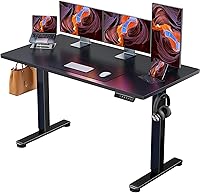
The ErGear desk has four memory presets, which means you can store a sit height and a stand height and return to each with one button. That makes resetting the monitor easier, because your desk base lands in the same spot every time.
How do you set the monitor height with a stand or arm?
Use the stand or arm to put the screen top at eye level, then check the tilt. A fixed stand only goes so high, so measure its top position against your standing eye line before you buy.
A monitor arm gives you a range. The ErGear Single Monitor Arm adjusts height up to 17.5 in and reach up to 18.1 in, so it can lift a screen well above a desk that stops short.
It fits 13–34 in screens up to 19.8 lb with 75x75mm or 100x100mm VESA patterns.
The VIVO Ultrawide Single Monitor Arm is the pick if you run a wide screen. It fits regular monitors up to 32 in and ultrawide screens up to 38 in, holds up to 22 lb, and adjusts up to 16 in along its center pole.
Both arms mount with a C-clamp or a grommet base. Check your desk thickness against the clamp range before you commit, since a thick top can rule out one of the mounting options.
If you run two screens, the spacing between them matters as much as the height. Our guide to a dual monitor standing desk covers how to line up two screens at the same eye level.
How do you keep the height right when you sit and stand?
Reset the screen every time you change posture. Sitting drops your eye line by several inches, so the monitor has to come down with you or you'll spend the sitting half of the day looking up.
The simplest method is to set two positions and treat them as fixed. Stand tall, set the screen top at eye level, and note the arm height or the desk preset.
Then sit, lower the screen until the top edge is at your seated eye line, and note that too.
If your arm has a height scale or your desk has presets, the numbers make this quick. Without them, a small mark on the arm pole or a sticky note on the desk edge works fine.
Keep the screen square to your face rather than angled to one side. A slight downward tilt of about 10–20 degrees is common and reduces glare from ceiling lights.
What about a laptop on a standing desk?
Raise the laptop so its screen top sits at eye level, then add an external keyboard. A laptop on the desk surface puts the screen far too low for standing work.
Use a laptop stand or a shelf to lift the screen, and put a separate keyboard and mouse at your standing elbow height. That keeps your hands relaxed while your eyes look straight ahead.
A laptop alone rarely reaches eye level without a riser. If you use the laptop screen plus a monitor, set the monitor as the main screen at eye level and place the laptop screen beside it at the same top height.
The same distance rule applies: about an arm's length from your eyes. A laptop pushed back to arm's length often makes text too small, which is one more reason an external monitor helps.
How long should you stand once the screen is set?
Start with short standing blocks and build up, rather than standing all day from the first week. Screen height fixes your posture, but it doesn't decide how long your legs can take.
Many people do well alternating roughly 30 minutes standing with 30 minutes sitting, then extending the standing blocks as they adjust. Our guide to how long should you use a standing desk covers how to build a routine that sticks.
When you switch, change the monitor height at the same time. A screen set for standing is too high once you sit, and the mismatch is what makes people slouch or crane their neck.
A standing mat helps with foot fatigue, but it doesn't change monitor height. Fix the screen position first, then add comfort items.
What are the common monitor height mistakes?
The most common mistake is a screen that's too low, usually because the desk surface is treated as the monitor base. That pulls your chin down and rounds your shoulders.
The second is a screen that's too high. If you have to tilt your head back to see the top edge, lower it.
Your head should balance over your shoulders, not tip backward.
The third is setting the height once and never changing it. A screen tuned for standing is wrong for sitting, and the reverse is also true.
Keep the screen about an arm's length away and centered on your body. A monitor pushed into a corner forces you to twist, which undoes the benefit of a good height setting.
Finally, don't chase a single number from a chart. Eye height varies a lot between people of the same overall height, so your own measurement beats any generic figure.
What's the decision rule for monitor height?
Measure your standing eye line, put the screen top at or just below it, and keep the screen about an arm's length away. Set the desk to your standing height first, then adjust the monitor to match.
If your desk stops short, an arm closes the gap. Choose the ErGear Single Monitor Arm for a standard screen that needs a big height and reach range.
Choose the VIVO Ultrawide Single Monitor Arm for a wide screen up to 38 in. Choose the ErGear 48 x 24 Electric Desk if the desk base itself is the limit.
The "how high should standing desk monitor be" answer stays the same all day: top third at eye level, head level, screen square to your face. Reset it when you sit, and the setup keeps working through both halves of your workday.
Frequently asked questions
Where should the top of my monitor sit when I stand?
Put the top edge roughly at eye level or just below it. That way your gaze rests on the upper part of the screen, your chin stays level, and you don't tip your head down to read the bottom rows all day.
How far away should a monitor be on a standing desk?
Start at about an arm's length, roughly 20–30 in from your eyes. Text should read easily without leaning in.
If you find yourself squinting or pushing forward, bring the screen a little closer before you raise or lower it.
Do I need a monitor arm for a standing desk?
Not always, but an arm makes height changes easy. A desk with limited up and down travel or a fixed shelf may leave the screen too low.
An arm lets you raise the screen to eye level without changing your working surface.
Should the monitor height change when I sit?
Yes. Sitting lowers your eye line by several inches, so the screen has to come down too.
Save a sit height and a stand height in your head or on a sticky note, and reset the screen each time you switch.
Is it bad to look down at a monitor all day?
A steep, constant downward gaze can leave your neck and shoulders stiff. Keeping the screen near eye level with your head balanced over your shoulders is the usual aim.
If discomfort continues, talk to a doctor or ergonomics specialist.