How to Set the Height on a Standing Desk
To set the height on a standing desk, raise the desktop until your elbows sit near a 90-degree bend with your shoulders relaxed, then save that position as a preset. Measure from the floor to your bent elbow for a starting number, fine-tune by feel, and set the monitor so its top edge is at eye level.
On this page (9 sections)
- How do you find your standing desk height?
- What is the usual standing desk height range?
- How do you set the height on an electric desk?
- How do you set the monitor after the desk height?
- How do you set height when you sit and stand?
- Does footwear or a mat change the height you set?
- How do you set height with a standing stool?
- What are the most common height-setting mistakes?
- How do you keep the height steady over time?
To set the height on a standing desk, raise the desktop until your elbows sit near a 90-degree bend with your shoulders relaxed, then save that position as a preset. Measure from the floor to your bent elbow for a starting number, fine-tune by feel, and set the monitor so its top edge is at eye level.
The number on the display matters less than how your body sits against the desk. A height that feels right for one person can be several inches off for another, so treat any chart as a starting point.
How do you find your standing desk height?
Start with your elbow height and adjust until your forearms rest level on the desktop. Bend your arm at about 90 degrees with your shoulder relaxed and measure from the floor to the underside of your elbow.
That figure is a good first setting.
The old rule of standing with your elbows at a right angle is a useful guide, not a law. What matters is that your shoulders stay down and your wrists stay flat over the keyboard.
Test the position with your hands on the keys. If you feel a shrug in your shoulders, the desk is too high.
If you lean forward or reach down to type, it's too low. Move it an inch at a time until the pressure leaves your neck and wrists.
Write down the number once it feels right. Most electric desks show the height on a small display, so you can return to it later without guessing.
What is the usual standing desk height range?
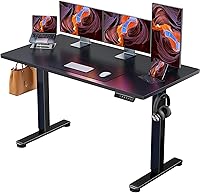
Most electric standing desks adjust between about 28 and 48 inches, which covers a wide span of adult heights. The ErGear 48 x 24 Electric Desk moves from 28.35 to 46.46 inches, so it fits many seated and standing positions within that band.
At the low end, 28 inches suits a seated position for most people around average height. At the top end, 46 inches is close to standing height for someone roughly 6 feet tall.
Shorter users will spend most of their time in the lower half of the range.
If your ideal height falls outside a desk's travel, the fix is a different frame or a standing desk converter that adds height. Our guide to what height should a standing desk be walks through the height-to-body-size math in more detail.
Very tall readers often need more than 48 inches. Check our notes on a standing desk for tall person setups before buying a frame with a short top end.
How do you set the height on an electric desk?
Clear the desk, press the up or down button to move it, and stop when your body settles into position. Then hold the memory button for that preset so the desk returns to the same spot later.
The controls vary a little by brand, but the sequence is similar. Most electric desks have up and down arrows, a display, and one or more memory keys.
On the ErGear desk, the lift motor is quiet enough to adjust while you're on a call, and the frame holds steady at full height.
Follow these steps:
- Remove anything that could tip as the desk moves.
- Press up until the surface reaches your measured elbow height.
- Sit or stand at the desk and check your shoulders and wrists.
- Nudge the height up or down an inch until it feels neutral.
- Hold the memory button until the display confirms the save.
- Repeat for your seated height and any other position you use.
Don't lean on the desk while it's moving. Wait for the frame to stop before you put weight on it.
How do you save a height preset?
Press and hold the memory key until the controller beeps or flashes, then release. The ErGear desk stores up to 4 preferred heights, so you can keep separate settings for standing, sitting and a second person.
Presets save the desktop height, not the monitor position. If you share the desk with someone much taller or shorter, you'll still need to adjust the monitor arm or stand.
How do you set the monitor after the desk height?
Set the monitor so its top edge sits at or slightly below eye level, then tilt it back a few degrees. The desk height comes first, because moving the desk later changes where your eyes meet the screen.
Your arms set the desk, and your eyes set the monitor. If the screen sits too low, you'll drop your chin and round your shoulders.
Too high and you'll tilt your head back, which strains the neck over time.
Sit or stand in your usual position and close your eyes briefly. Open them and look straight ahead.
That spot should land near the top of the screen, not the middle.
A monitor arm gives you more freedom than the stand that comes in the box. If you raise the desk often, the arm lets you keep the screen at eye level without stacking books underneath.
How do you set height when you sit and stand?
Save one preset for standing and one for sitting, and switch between them on a schedule. The point of an adjustable desk is movement, not a single perfect posture.
Set your seated height first. Your feet should rest flat on the floor or a footrest, your knees near a right angle, and your forearms level with the desk.
Save that as a preset.
Then set the standing height and save it too. On a two-preset controller, one button drops the desk to sitting and the other raises it to standing.
The ErGear desk's memory keys make the change quick enough that you'll actually do it.
Build a rhythm rather than standing all day. Change position before stiffness sets in, not after.
Does footwear or a mat change the height you set?
Yes. Thick soles and a cushioned mat both add height under your feet, so set the desk while wearing the shoes or mat you'll use most.
A standing mat can add close to an inch underfoot. The FEATOL Anti-Fatigue Mat is 0.9 inches thick, so your elbow height rises by nearly that much when you stand on it.
Set the desk while standing on the mat, not beside it.
The mat's high-density foam and beveled edges keep it from sliding underfoot. Measure your standing height with the mat in place if you plan to use it every day.
If you switch between bare feet and thick-soled shoes, expect the desk to feel a little off in one of them. Save the height you use most and accept the small gap.
How do you set height with a standing stool?
A standing stool lets you perch at a middle height, so set the desk for your leaning or half-sitting position rather than a full stand. Then set the stool so your feet rest on its footrest.
Perching takes weight off your feet while keeping you more upright than a chair. The IWMH Standing Desk Stool adjusts from 25.59 to 33.46 inches, so you can match it to a standing desk or a standard desk.
Set the stool height first, then bring the desk up to your bent-elbow height while you perch. Save that as a separate preset from your full standing height.
The stool's round base swivels, so you can turn to reach a second screen or a printer.
What are the most common height-setting mistakes?
The biggest mistake is setting the desk by eye and never checking your arms. A desk that looks right in a photo can be several inches too high for your body.
Other mistakes show up again and again. Setting the height without the mat or shoes you'll use.
Raising the monitor when the desk moves instead of leaving it at eye level. Forgetting to save a preset and guessing the number each time.
And standing for hours without sitting down.
A desk that's too high pushes your shoulders up and shortens your reach. One that's too low makes you lean and rounds your back.
Both feel fine for a few minutes and uncomfortable by the end of the day.
If your arms or neck ache after an hour, reset the height and check the monitor position. Small changes make a bigger difference than a new desk.
How do you keep the height steady over time?
Check the frame's weight limit and keep the load even, because an overloaded or unevenly loaded desk can wobble at standing height. The ErGear desk's steel frame carries up to 176 lb and is tested for 100,000 lift cycles.
Keep the heaviest items centered and away from the edges. A monitor arm clamped to one side adds leverage, so balance it with weight on the other side or move the clamp toward the middle.
Recheck the preset after you rearrange the desk. If the desk shakes when you type, the load or the floor is usually the cause.
Weight matters when you move the desk too. Our guide to how much does a standing desk weigh helps you plan for the lift if you rearrange the room.
For a broader look at frames and accessories, see our standing desk for home office buying guide. It covers what to check before you commit to a size and height range.
Frequently asked questions
How do I know my standing desk height is correct?
Your elbows should bend about 90 degrees with your shoulders relaxed and your wrists straight over the keys. If you have to shrug or reach down, the desk is off.
Check that your monitor top sits at eye level once the desk is set.
Should the desk height change when I wear different shoes?
Yes. Thick soles or slippers can shift your standing height by an inch or more.
Set the desk in the shoes you usually wear at your desk, or adjust the preset when you change footwear.
It takes seconds with a memory button.
How long should I stand at a standing desk each day?
Start with 15 to 20 minutes of standing for every 30 to 45 minutes of sitting and build up slowly. The goal is regular movement between the two positions, not standing all day.
Change position before you feel stiff.
Why does my standing desk stop at a certain height?
Many electric desks have a set travel range, such as 28.35 to 46.46 inches on the ErGear model. The desk won't go past those limits.
If your target height sits outside the range, you'll need a different desk frame or a platform.
Can I save more than one standing height?
Yes on desks with memory presets. The ErGear desk stores up to 4 heights, so you can keep one for standing and one for sitting and switch with a button.
Save a third for a tall coworker or a different pair of shoes.