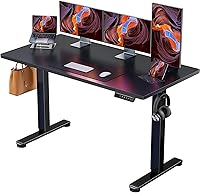
Standing Desk for Home Office: Buying Guide
A standing desk for a home office should fit your room, work surface needs and sitting and standing heights. Measure the space, check the desk’s height range and choose the controls and features you’ll use.
On this page (8 sections)
- What should you check before choosing a standing desk for a home office?
- Which desktop size fits your home office?
- What height range should you look for?
- Should you choose electric or manual height adjustment?
- How do you plan monitors, cables and accessories?
- How can you make assembly easier?
- Which standing desk should you choose for your home office?
- How we research these desks
The best standing desk for a home office depends on your room, equipment and sitting and standing heights. Measure the available floor space, compare the desktop dimensions with your gear, then check the desk’s height range and controls.
All four options here are electric, and three list memory presets. They range from a compact 48 x 24 in top to wider models with cable features or a deeper work surface.
What should you check before choosing a standing desk for a home office?
Start with the space you have and the work setup you need to fit. Desktop width and depth affect how your monitor, keyboard and other items can sit together.
| Check | What to measure or confirm |
|---|---|
| Room space | Desk footprint, chair space and walking paths |
| Desktop | Width and depth for monitors, keyboard and work items |
| Height range | Whether the low and high settings suit your seated and standing positions |
| Controls | Buttons and saved height presets |
| Cables | Slack for the full travel range and a route clear of moving parts |
| Assembly | Instructions and any tools you may need |
Measure the proposed desk area, then account for the space your chair uses when you pull it back. Check nearby doors, drawers and shelves so the desk does not block something you use.
Measure your equipment too. Desk width alone cannot tell you whether two monitors, their stands and your keyboard will fit, so compare the actual footprint of each item with the desktop.
Which desktop size fits your home office?
Choose a desktop based on the equipment you use and the space the desk can occupy. A 48 x 24 in option takes less room than a 55 in wide desk, while a deeper top provides more front-to-back workspace.
A compact desk may work for a laptop, one monitor and a few everyday items. If you use two monitors or keep paperwork on the desk, compare wider or deeper options and plan where each item will sit.
The products below cover those size options. Check that the dimensions suit your room and equipment.
ErGear 48 x 24: a compact work surface
The ErGear 48 x 24 Electric Desk has a 47.2 in wide by 23.6 in deep work surface and an electric height range of 28.35 to 46.46 in. It has up to 4 memory presets.
Its frame is alloy steel, and the desk uses low-VOC materials. ErGear says it was tested for 100,000 lift cycles.
Consider it when floor space is tight and your equipment fits within its 47.2 x 23.6 in work area. If you need more room for paperwork or multiple screens, compare a wider desktop.
Veken 55 Inch: a white desk with cable features
The Veken 55 Inch Electric Desk, White, has a 55.12 in wide by 23.64 in deep desktop and an electric height range of 28.3 to 46.5 in. It has memory presets and a cable clip.
The desktop is made of two boards, so its center seam may matter if you prefer a one-piece surface. It comes with 2 headphone hooks and a cable clip.
Veken says the motor runs below 52 dB.
Consider it if you want a white desk with space for multiple monitors, while checking that the depth and center seam suit your setup. Read our standing desk for two monitors guide for ways to plan a multi-screen layout.
ErGear 55 x 28: more depth for larger setups
The ErGear 55 x 28 Electric Desk has a 55.1 in wide by 27.6 in deep desktop and an electric height range of 28.35 to 46.46 in. It has up to 4 memory presets.
The added depth gives you more front-to-back room to place a monitor and keyboard. Its frame is alloy steel, and ErGear says the desk was tested for 100,000 lift cycles.
Consider it when a 24 in deep desktop feels limiting, such as when you use larger screens or keep extra work items close by. Check that the wider footprint leaves enough clearance in your room.
Furmax 55 Inch: a 55 in option with a T-shaped base
The Furmax 55 Inch Electric Desk has a 55 in wide by 24 in deep desktop and an adjustable height range of 28.7 to 46.4 in. Its base has a T-shaped design.
The desk has 1 or 2 memory keys, a cable hole and a headphone hook. Furmax says the motor includes safety lock, anti-collision and overheat protection features.
Consider it if those features fit your routine, and make sure you are comfortable with a two-piece desktop. Furmax describes the top as two joined boards.
What height range should you look for?
Choose a desk whose lowest and highest settings work for your seated and standing positions. A broad height range does not guarantee a comfortable fit for every person, chair or keyboard setup.
The four desks in this guide have ranges starting between 28.3 and 28.7 in and reaching between 46.4 and 46.5 in. Compare these limits with your body and the chair and footwear you use, then check whether your keyboard can sit at a comfortable position.
Set the desk while seated so your shoulders stay relaxed and your elbows sit near a right angle as you type. Raise it for standing work and adjust again rather than assuming the same height fits both postures.
If you are taller than average, check the upper limit carefully before buying. Our standing desk guide for tall people explains what to compare.
Should you choose electric or manual height adjustment?
An electric desk changes height using a motor and button controls, while a manual desk uses a hand crank or another non-electric mechanism. Choose based on how often you plan to adjust the desk and which control style suits you.
The four options here are electric and include memory presets. Furmax also describes safety functions for its model.
If you would rather avoid a motor, compare the options in our manual vs electric standing desk guide.
Think about cord access and the outlet location when planning an electric desk. Leave enough cable slack for the desk to move from its lowest to highest position, and keep cords clear of the frame.
How do you plan monitors, cables and accessories?
Plan the desktop layout before assembly, including where screens, keyboard and cables will go. A monitor arm, keyboard tray or cable tray can change the clearance you need and how much top space remains.
Measure the base or clamp for a monitor arm and compare its position with the desktop edge and frame. See our monitor arm guide for standing desks before adding one.
For moving cables, leave a loop with enough slack for the full height range and secure cords so they cannot catch on the frame. Our standing desk cable management guide covers ways to route and group them.
A keyboard tray can free up desktop space, but it also changes typing height and knee clearance. Check our standing desk keyboard tray guide if you are considering one.
How can you make assembly easier?
Assembly is easier when the room and instructions are ready first. Clear a space for the parts and plan whether you need another person to help lift or turn the frame.
ErGear says the 48 x 24 model includes tools and simplified assembly guidance. The 55 x 28 model includes instructions and a video, while Veken includes an instruction manual.
Furmax includes assembly instructions.
Follow the instructions for the exact desk and keep fasteners organized as you work. Before using the height controls, check that the desk is level, cords are clear and the work area around the legs is free of obstructions.
For a practical walkthrough after you choose a desk, read how to set up a standing desk in your home office.
Which standing desk should you choose for your home office?
Choose the ErGear 48 x 24 if a compact surface and 4 memory presets fit your space and routine. Choose the Veken 55 Inch White if you want a white desk with a cable clip and headphone hooks.
Choose the ErGear 55 x 28 if you need more depth for screens and work items. Choose the Furmax 55 Inch if its 55 x 24 in desktop, T-shaped base and described safety features match your needs.
Measure the room and equipment first, then compare desk height ranges with your sitting and standing positions. Once the desk is in place, use our standing desk setup guide to arrange your work area.
How we research these desks
We compare each desk’s dimensions, height range, controls and stated features. Our score weighs specs and features against how well each desk fits a home office setup.
Frequently asked questions
What size standing desk works for a home office?
Choose a desk that fits your room and leaves space for your chair, walking path and drawers or doors to open. A 48 x 24 in top is a compact option, while 55 in wide models give you more room for equipment.
Check the exact dimensions before deciding.
Is an electric standing desk worth it for a home office?
An electric desk lets you change height with button controls, which can make switching between sitting and standing simpler during the day. Presets can save preferred heights on some models.
Compare the height range, top size and any features you will use before choosing.
How high should a standing desk be?
Set the desk so your shoulders can stay relaxed and your elbows are near a right angle while typing. The right setting depends on your body and equipment, so adjust the desk while seated and standing.
See our guide to standing desk height for setup details.
Can a standing desk fit two monitors?
It can, if the desktop has enough usable width and depth for both screens, their stands or an arm, and your keyboard and mouse. Measure your equipment and compare that footprint with the desktop dimensions.
A wider desk may suit a two-monitor setup better.
Do standing desks need cable management?
Cable management can help keep cords together as the desk moves, but you still need enough slack for the full height range. Route cables so they cannot snag on the frame or pull on plugs.
Our standing desk cable management guide covers trays, boxes and clips.