11 Best Standing Desk Converters (October 2026)
The best standing desk converters include the VIVO 32 Inch Manual Desk Converter for compact dual monitors, the VIVO 36 Inch Desk Converter for wider manual setups, and the FlexiSpot 36 Inch Desk Converter for reinforced spring lift.
On this page (5 sections)
A standing desk converter sits on your current desk and lifts your work surface for sitting or standing. The VIVO 32 Inch Manual Desk Converter is a strong compact choice, while 36 in tops add room and electric models offer button-controlled adjustment.
Measure your desk, monitors, keyboard and laptop before choosing. If you’re still deciding between a riser and a full desk, our standing desk guide for a home office explains the difference.
Our picks at a glance
-
1

-
2

-
3

- 4
 Check it
VIVO Dual Tier 36 Inch Converter
Best for separate typing tier - 5
 Check it
Vari Pro Plus 36 Desk Converter
Best for no-assembly setup - 6
 Check it
PowerPro 36 Inch Electric Converter
Best for heavy electric setups - 7
 Check it
TechOrbits 32 Inch Desk Converter
Best for low starting height - 8
 Check it
VIVO 36 Inch Electric Desk Converter
Best for removable keyboard tray - 9
 Check it
FITUEYES 32 Inch Desk Converter
Best for dual gas springs - 10
 Check it
Sanodesk 36 Inch Desk Converter
Best for a wide keyboard tray - 11
 Check it
JOY worker 32 Inch Desk Converter
Best for white desks
Which standing desk converters fit different setups?
The right standing desk converter depends on your desk footprint, equipment and preferred lift. These 11 picks include compact and wide manual models, spring lifts and electric options.
VIVO 32 Inch Manual Desk Converter: Best for compact dual monitors
- 31.5 x 15.7 in top
- Synchronized keyboard tray
- 4.5–20 in height range
- 33 lb desktop capacity
A compact top and synchronized keyboard tray suit a smaller workstation that still needs room for two monitors. The manual lift assist adjusts from 4.5 to 20 in.
Pros
- Keyboard tray moves with the top
- Height range starts at 4.5 in
- Minimal assembly
Cons
- Manual adjustment
- Measure the surface against your equipment
The VIVO 32 Inch Manual Desk Converter earns the top spot because its 31.5 x 15.7 in surface balances a compact footprint with room for a dual-monitor arrangement. Its keyboard tray moves with the top, so the keyboard rises as the screens do.
The manual lift assist adjusts from 4.5 to 20 in, and the desktop supports up to 33 lb. Place it on your desk, attach the tray, and check your monitor and accessory weights before loading the surface.
Choose it for a smaller desk that still needs space for two monitors. If you want more width, the next VIVO model gives you a 36 in top.
VIVO 36 Inch Desk Converter: Best for wider manual setups
- 36 x 15.7 in top
- Synchronized keyboard tray
- 4.5–20 in height range
- 33 lb desktop capacity
The wider surface gives a dual-monitor or laptop-and-monitor setup more room. Its keyboard tray rises with the top, and the manual lift adjusts from 4.5 to 20 in.
Pros
- Wider top than the 32 in picks
- Synchronized keyboard tray
- Minimal assembly
Cons
- Manual adjustment
- Needs sufficient desk depth and width
The VIVO 36 Inch Desk Converter is a good fit when a 32 in top feels tight. Its 36 x 15.7 in surface makes more room for dual monitors or a laptop-and-monitor arrangement, and the keyboard tray rises with the top.
This manual model adjusts from 4.5 to 20 in. The desktop capacity is 33 lb, and the keyboard tray capacity is 4.4 lb.
Pick it when you want more width and are comfortable with a manual lift. Measure your desk depth as well as width, and see our guide to a standing desk for a laptop if that is your main setup.
FlexiSpot 36 Inch Desk Converter: Best for reinforced spring lift
- 36 in top
- Mechanical spring lift
- 33 lb top capacity
- 4.4 lb keyboard tray capacity
This 36 in converter pairs a mechanical spring lift with a reinforced steel frame and room for dual monitors. The top supports up to 33 lb, with 4.4 lb on the keyboard tray.
Pros
- Mechanical spring lift
- Designed for dual monitors
- Almost fully assembled
Cons
- Height range not stated
- Top depth not stated
The FlexiSpot 36 Inch Desk Converter pairs a mechanical spring lift with a reinforced steel frame. FlexiSpot describes the 36 in top as suitable for dual monitors; the top supports up to 33 lb and the tray up to 4.4 lb.
It arrives almost fully assembled, with the keyboard tray left to attach. The height range and top depth are not stated, so those details matter if you need a precise fit for a particular desk or working position.
Choose it for a wide spring-lift model with clear load limits. Skip it if you need a published adjustment range before buying.
VIVO Dual Tier 36 Inch Converter: Best for separate typing tier
- 36 in desktop
- Separate keyboard tier
- Dual pneumatic spring lift
- 3-year manufacturer warranty
A two-tier layout separates the monitor surface from the keyboard. It adjusts 6–17 in above your existing desk and includes a 3-year manufacturer warranty.
Pros
- Separate monitor and keyboard surfaces
- Dual pneumatic spring lift
- Warranty stated by VIVO
Cons
- Heavier at 33 lb
- Check the 22 in depth against your desk
The VIVO Dual Tier 36 Inch Converter separates the monitor surface from the keyboard area. Its 36 x 22 in desktop gives monitors their own upper tier, while the keyboard tray raises in sync with it.
Dual pneumatic springs assist the manual lift, which adjusts from 6 to 17 in above your desk. At 33 lb, it is a heavier unit, so confirm both desk space and handling before setting it up.
Pick it if you prefer a separate typing tier and have a deep desk. For setup guidance, read how to set up a standing desk.
Vari Pro Plus 36 Desk Converter: Best for no-assembly setup
- 36 x 12.25 in upper tier
- Two-tier design
- Spring-assisted lift
- No assembly required
This two-tier converter separates monitors from the keyboard and mouse area. It arrives assembled and uses a spring-assisted rowing lift with dual handles.
Pros
- No assembly required
- Dual handles
- Two-tier layout
Cons
- Check the full footprint
- Manual lift
Vari’s Pro Plus 36 has a two-tier layout with a 36 x 12.25 in upper surface for monitors and a lower deck for the keyboard and mouse. Its spring-assisted rowing lift has dual handles, and the converter arrives assembled.
This is a good fit if you want a ready-to-use riser and prefer keeping typing equipment on a separate level. Vari describes the design as using dual stability bars and a heavy base.
The product dimensions include conflicting measurements, so verify the footprint before buying. Choose it when avoiding assembly matters more than having an electric lift.
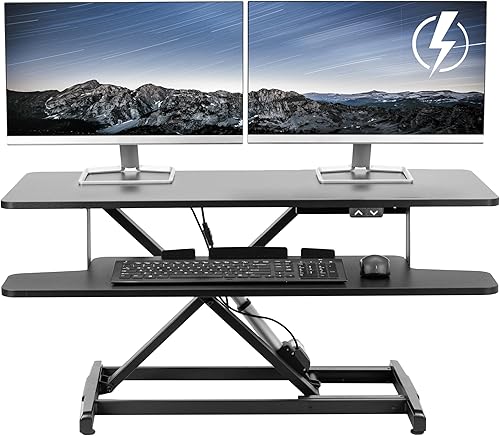
PowerPro 36 Inch Electric Converter: Best for heavy electric setups
- Push-button motorized lift
- 80 lb stated capacity
- Built-in USB charging port
- Three cable grommet holes
A push-button lift, 80 lb stated capacity, USB port and three cable grommet holes make this an electric option for larger setups. Its 24 in depth calls for a careful desk measurement.
Pros
- Electric height adjustment
- USB charging port
- Cable routing holes
Cons
- Check whether its depth fits your desk
- Monitor arms are separate
The PowerPro 36 Inch Electric Converter suits buyers who want push-button height changes and a high stated capacity. Its electric lift is rated for 80 lb, and the two-tier surface separates monitors from the keyboard.
A built-in USB charging port and three cable grommet holes support a tidier setup. The converter measures 36 in wide and 24 in deep; monitor arms are separate, so include their weight and mounting needs in your plan.
Choose it if electric adjustment and cable routing are priorities. Skip it if your desk cannot accommodate its 24 in depth.
TechOrbits 32 Inch Desk Converter: Best for low starting height
- 32 in wide
- Pneumatic lift
- 4.3–19.9 in height range
- 33 lb capacity
This compact pneumatic converter starts at 4.3 in and adjusts to 19.9 in. The mostly assembled unit needs its keyboard tray attached.
Pros
- Height range starts at 4.3 in
- 33 lb stated capacity
- Minimal setup
Cons
- Particle-board surface
- Check desk depth
TechOrbits offers a compact 31.5 in wide workstation with a pneumatic lift. Squeeze the handle and use your weight to adjust it from 4.3 to 19.9 in.
The top supports up to 33 lb, and the keyboard tray attaches during setup. Its surface is particle board, and the aluminum frame gives you a defined 32 in class footprint to compare against other compact options.
Pick it for a manual pneumatic lift with a low starting position. Measure the full 16.1 in depth and skip it if you want button control.
VIVO 36 Inch Electric Desk Converter: Best for removable keyboard tray
- 36 x 15.7 in top
- Electric lift
- 5.7–19.5 in height range
- 50 lb desktop capacity
A motor raises this 36 in top at the push of a button. It has a defined 5.7–19.5 in range, a 50 lb desktop capacity and a removable keyboard tray.
Pros
- Electric lift
- Keyboard tray can be removed
- 50 lb desktop capacity
Cons
- Check power and control placement
- Requires some assembly
The VIVO 36 Inch Electric Desk Converter uses a motor and button control to raise its 36 x 15.7 in top. It adjusts from 5.7 to 19.5 in and supports up to 50 lb on the desktop.
Its 12 in deep keyboard tray rises with the top and can be removed if you prefer one open surface. The unit comes almost ready to use, with some assembly required.
Choose it for powered adjustment with a removable tray and a defined range. Check that an outlet and cable route work at the desk before arranging your equipment.
FITUEYES 32 Inch Desk Converter: Best for dual gas springs
- 31.5 x 15.7 in top
- Dual gas springs
- 4.3–19.8 in height range
- 33 lb capacity
A compact top and dual gas springs suit a smaller workstation that needs manual height changes. The stated range runs from 4.3 to 19.8 in.
Pros
- Dual gas-spring lift
- Keyboard tray included
- 33 lb stated capacity
Cons
- Confirm the full footprint fits
- Manual adjustment
FITUEYES pairs a 31.5 x 15.7 in top with dual gas springs and an adjustment range of 4.3 to 19.8 in. The top supports up to 33 lb, and a keyboard tray is included.
This is a sensible compact option if you want gas-spring assistance. Its full footprint measures 31.5 x 24.2 in, so measure the desk depth rather than relying on the top dimensions alone.
Pick it if you want dual gas springs in a compact-width model. Our guide to standing desk height can help you plan your seated and standing positions.
Sanodesk 36 Inch Desk Converter: Best for a wide keyboard tray
- 36 x 16.3 in workstation
- 4.7–19.6 in height range
- 33 lb top capacity
- 4.4 lb keyboard tray capacity
This spring-lift workstation has a wide keyboard tray that rises with the top. The main surface supports up to 33 lb, and the tray up to 4.4 lb.
Pros
- Wide 34.6 x 12.2 in keyboard tray
- Mechanical spring lift
- Defined height range
Cons
- Requires tray installation
- Check the full depth against your desk
Sanodesk combines a 36 x 16.3 in workstation with a mechanical spring lift. It adjusts from 4.7 to 19.6 in, and the top supports up to 33 lb.
Its 34.6 x 12.2 in keyboard tray rises with the main surface and supports up to 4.4 lb. Setup requires attaching the tray with screws, and the overall footprint is 24.9 in deep.
Choose it if a wide keyboard tray and stated height range matter to you. If your desk is shallow, look for a converter with a smaller full footprint.
JOY worker 32 Inch Desk Converter: Best for white desks
- 31.5 x 15.7 in top
- 4.9–19.3 in height range
- 28.6 lb top capacity
- Removable keyboard tray
This white converter has a compact top and removable tray that rises with it. Its stated top capacity is 28.6 lb.
Pros
- White finish
- Removable keyboard tray
- Two-step tray installation
Cons
- Lower top capacity than several picks
- Check the desk footprint
The JOY worker 32 Inch Desk Converter stands out for its white finish and removable keyboard tray. Its 31.5 x 15.7 in top adjusts from 4.9 to 19.3 in.
The top capacity is 28.6 lb, with up to 4.4 lb on the keyboard tray. The tray moves with the top and installs in two steps, making this a fit for a lighter monitor-and-laptop setup.
Pick it if you want a white compact converter and your equipment stays within its lower capacity. Skip it for a heavy monitor arrangement that needs more load headroom.
How do you choose a standing desk converter?
Choose a standing desk converter by matching its footprint, lift style, adjustment range and capacity to your desk and equipment. A wide top will not help if the base overhangs your desk or the surface cannot reach your working height.
What size converter fits your desk and monitors?
Measure the width and depth of your desk, then sketch the space used by monitor stands, laptop, keyboard and mouse. Leave room for anything else you need to reach while working.
A 32 in top can work for a compact arrangement, while 36 in models give you more width. Compare the full base footprint too, because the platform dimensions do not show how much desk space the lift structure needs.
Which lift style should you choose?
Manual converters use a handle, lift assist, spring or gas springs to help move the surface. They suit you if you are comfortable changing height by hand and want to avoid relying on a motor and power cord.
Electric converters use a motor and button control. They make repeated height changes easier to command, but you need a suitable outlet and a cable path that remains clear as the converter moves.
How much height adjustment do you need?
Measure from the desktop to the height where your keyboard and monitor should sit, then compare that with the converter's range. Remember the riser sits on top of your desk, so its own minimum height adds to the desk height.
At both seated and standing positions, aim to keep your shoulders relaxed while typing and your screen in a comfortable line of sight. The standing desk height guide covers the measurements to check.
How much capacity is enough?
Add the weight of everything that will sit on the top, including monitor stands, monitors, laptop and accessories. Compare the total with the desktop limit, and check the keyboard tray limit separately.
Keep the load within the stated limits and spread equipment across the usable surface. A converter can feel cramped even under its weight limit if large monitor stands leave too little room for your keyboard and mouse.
How should you set up and use a converter?
Set up a converter on a stable desk with enough clear space for its full footprint and movement. Attach any required tray before loading it, then arrange the screen and keyboard for both sitting and standing positions.
Start with the monitor platform and keyboard tray clear. Follow the included instructions, tighten the required connections, and check that the converter sits flat without hanging over the desk edge.
Add equipment gradually and keep its weight within the top and tray limits. Route power and monitor cables so they do not snag, pull tight or catch under the moving frame; our guide to standing desk cable management has practical ways to keep cords organized.
Set the keyboard and mouse where your arms can stay relaxed, then raise the screen so you are not craning your neck. If the monitor sits too low or high at the standing position, adjust its placement before changing your posture to compensate.
Use the converter to alternate positions as comfort and work allow. You do not need to stand for a full workday; begin with manageable periods, keep moving, and return to sitting when standing stops feeling comfortable.
Keep the surface clean and avoid leaning heavily on the extended platform. Check screws and moving parts periodically, and follow the care directions that come with your converter.
What common converter buying mistakes should you avoid?
The most common mistake is choosing by top width alone. A 36 in surface may fit your monitors but still need more front-to-back desk space than you have.
Another mistake is treating the total capacity as a target rather than a limit. Include monitor arms and stands in your weight estimate, and check the keyboard tray separately when it has its own rating.
Do not assume every lift reaches the same height or uses the same motion. Measure your intended working position against the range, and choose a manual or electric style you will be comfortable adjusting regularly.
Finally, do not place a converter on an unstable, narrow or cluttered desk. A full platform needs enough support beneath it and room around it to move without knocking into lamps, shelves or other equipment.
Which standing desk converter should you choose?
Choose the VIVO 32 Inch Manual Desk Converter for a compact dual-monitor setup with a synchronized keyboard tray and 4.5–20 in range. Pick the 36 in VIVO manual model when you need more width, or the VIVO electric model when a defined range and button control matter more.
Choose the PowerPro if you need an electric lift and its deeper footprint fits your desk. For a separate keyboard tier, compare the VIVO Dual Tier or Vari; for a white compact unit, the JOY worker is the distinct choice if your equipment stays within its lower capacity.
A converter is a practical way to keep your current desk while adding height adjustment. If you need a new base and desktop instead, compare our standing desk frame picks.
Sources
- VIVO manual converter
- FlexiSpot 36 in converter
Our top 3 picks at a glance
-
1
-
2
-
3
Frequently asked questions
What size standing desk converter should I get?
Choose a converter wide and deep enough for your monitors, laptop, keyboard and mouse, then check that its base fits your desk. A 32 in top can suit a compact setup, while 36 in gives you more width.
Measure both the equipment and desk before choosing by width alone.
Are standing desk converters stable?
Stability depends on the converter, its load and how high it is raised. Keep the weight on the top and keyboard tray within their separate stated capacities, position equipment securely, and follow the setup instructions.
Also check that the base sits fully on the desk.
Is a manual or electric desk converter better?
A manual converter suits you if you are comfortable using a handle or lift assist to change the height. An electric model uses a motor and button control, which can suit frequent changes or anyone who prefers not to lift the surface.
Compare range, capacity and power needs before deciding.
Can I use a standing desk converter with two monitors?
Yes, if the top is wide and deep enough for both monitors and their stands, and their combined weight stays within the desktop capacity. A dual-monitor description does not mean every stand arrangement will fit.
Measure the setup you plan to use.
Do I need a keyboard tray on a desk converter?
A keyboard tray gives your keyboard and mouse a separate lower surface, and many models raise it with the monitor platform. That can keep the keyboard position consistent as you change the top height.
Check tray size and capacity, or choose a removable tray if you prefer typing on the main surface.


