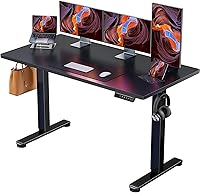
Standing Desk for a Laptop: Sizes That Work
For a standing desk for a laptop, match the top to your laptop, keyboard, mouse, and any extra screen. Choose a compact 32 x 19 in desk for a tight space, a 40 x 24 in top for more room, or a converter if you already have a desk.
On this page (8 sections)
- What size standing desk for a laptop fits your setup?
- How much desk depth do a laptop and keyboard need?
- Should you buy a standing desk or a converter?
- When is a deeper laptop desk worth the space?
- What should you check before adding a monitor?
- How do you set up a laptop standing desk?
- What common sizing mistakes should you avoid?
- Which standing desk for a laptop should you choose?
A standing desk for a laptop should fit your laptop, keyboard, and mouse while leaving room to work. For a compact setup, start with a 32 x 19 in surface; choose a larger top if you add a monitor, papers, or other gear.
Measure the devices you use together, not just the laptop. Then check desk height, adjustment range, floor space, and whether you want the whole desk to move or only the work surface.
What size standing desk for a laptop fits your setup?
A 32 x 19 in desktop is a compact starting point for one laptop and a few accessories. Move up in width or depth if you use a separate screen, keep papers open, or want more space between devices.
Width runs from left to right, while depth runs from the front edge to the back. A top can be wide enough for a laptop but too shallow to place a keyboard in front without pushing your hands close to the edge.
The HUANUO 32 x 19 Small Electric Desk is a compact choice for a bedroom, apartment, or office corner. Its top measures 32 x 19 in, and its electric frame adjusts from 28.3 to 46.5 in with 4 memory presets.
Before buying, sketch your usual layout on paper or mark it on the floor with tape. Put the laptop toward the back, then leave space for your keyboard and mouse in their working positions.
How much desk depth do a laptop and keyboard need?
Choose enough depth to place the laptop behind the keyboard without crowding your hands. Include the mouse beside the keyboard and allow for cables to reach without pulling as the desk moves.
For a laptop-only setup, a shallow top may be enough if you type directly on the laptop. A separate keyboard changes the layout because it sits in front of the screen; a mouse also needs clear space at one side.
The Sanodesk 40 x 24 in desk gives you a larger surface for arranging a laptop and accessories. It adjusts from 28.9 to 46.5 in and has 4 height memory buttons, so more than one person can save preferred positions.
Choose the larger top if you move between work materials or use a laptop with a separate monitor. If you mainly use one laptop in a tight corner, the extra area may take floor space you don't need.
Should you buy a standing desk or a converter?
Buy a full standing desk when you want the entire work surface to rise; choose a converter when you want to keep your current desk. A converter saves you from replacing the desk, but the devices must fit on its smaller platform.
The VIVO single top converter has a 26.4 x 18.5 in platform and 5 lockable height settings. Its load limit is 17.6 lb, so count the laptop, keyboard, and anything else placed on it before setting up.
The converter sits on top of your current desk, so the final standing height depends on both the converter and the underlying desk. Check whether the raised screen and keyboard positions suit you, and review this guide to standing desk converters if you want to compare other approaches.
Skip a converter if you need a broad, clear work surface or your existing desk is already too high. Also avoid placing more weight on the platform than its stated limit.
When is a deeper laptop desk worth the space?
Choose a deeper top when you want a laptop, separate keyboard, and accessories within reach. Drawers can keep small items off the work surface, but storage doesn't replace the room needed for your hands and devices.
The Huanuo desk with 2 drawers has a 31.5 in wide by 20.9 in deep top, along with 2 drawers and an open storage cubicle. It suits a small workspace where you want to keep accessories nearby and out of the way.
This desk is a sensible middle option if a 32 x 19 in top seems tight but you don't want a much wider desk. Skip it if you don't need built-in storage or would rather use the surface area for a larger display.
Keep frequently used items in reach, but don't crowd the area where your keyboard and mouse need to sit. Use the drawers for items you don't need while typing.
What should you check before adding a monitor?
A laptop and external monitor need room for both screens, their stands, and your input devices. Measure the full arrangement before picking a top rather than judging by screen size alone.
A monitor arm can free up some of the surface, but it needs a desk edge that accepts its clamp and enough clearance to attach it securely. Read whether a monitor arm can work on a standing desk before counting on one to solve a space problem.
For two screens, also plan where the keyboard, mouse, and cables will go. The guide to standing desks for two monitors covers the larger layouts that need more room.
How do you set up a laptop standing desk?
Set the screen and keyboard at comfortable working heights, then save the positions you use most. Move between sitting and standing as needed, and make sure the cables have enough slack throughout the desk's height range.
Assemble the desk on a clear floor area and follow its included instructions. Before placing equipment, check that the desktop is level and that the area around the legs is clear of furniture, cords, and objects that could block movement.
For electric desks with memory buttons, save a sitting height and a standing height after you find positions that work for you. Keep hands, pets, and loose objects clear while the desk moves, and avoid pulling cables tight at either height.
Use the standing desk setup guide to check screen and keyboard placement. If you're choosing among full desks, the home office standing desk guide covers other room and workspace needs.
What common sizing mistakes should you avoid?
Don't choose by laptop size alone or assume a larger height range will fix a cramped layout. Surface dimensions, device placement, and the desk's fit in the room all matter.
Common mistakes include:
- Measuring the laptop but forgetting the keyboard and mouse.
- Checking width but not depth, then finding there's no room in front of the screen.
- Adding a monitor without measuring its stand or mount.
- Ignoring floor space, chair clearance, doors, and drawers.
- Overloading a converter by counting only the laptop's weight.
- Letting cables become taut when the desk rises.
A quick paper outline or tape layout can reveal a poor fit before assembly. Test the device arrangement inside that boundary, including the space your hands need while typing.
Which standing desk for a laptop should you choose?
Choose based on your full setup and room: compact electric desk for a tight space, larger top for more gear, or converter for an existing desk. The right choice leaves enough room to type and move without making the workspace harder to use.
Pick the HUANUO 32 x 19 in desk if you need an electric option for one laptop in a small room. Choose the Sanodesk 40 x 24 in desk if you want more room for a separate keyboard, mouse, or additional items.
Choose the Huanuo desk with drawers if storage and a little more depth matter. Pick the VIVO converter if your current desk works and the laptop setup fits within the converter's platform and load limit.
Measure the devices, desk area, and room before you decide. For a wider setup, compare the standing desk for home office guide.
Frequently asked questions
What size standing desk is best for a laptop?
A 32 x 19 in surface can fit a compact laptop setup, but measure your laptop and accessories first. Add room for a separate keyboard and mouse if you use them.
Choose a wider or deeper top if you need a monitor, papers, or space to spread out.
Is a 40 x 24 in desk big enough for a laptop?
A 40 x 24 in desk gives you more width and depth than a compact 32 x 19 in top. That can help you arrange a laptop, separate keyboard, mouse, and a few small work items.
Measure your equipment and the available floor space before choosing.
Can a standing desk converter hold a laptop?
Yes, if its platform fits your devices and their combined weight stays within its limit. The VIVO single top converter measures 26.4 x 18.5 in and supports up to 17.6 lb.
Include the laptop, keyboard, mouse, and any other items that will sit on the platform.
How much space should be behind a laptop on a standing desk?
Leave enough room for the laptop to sit securely, with cables reaching without being pulled tight. Include a separate keyboard and mouse in your layout.
If the keyboard crowds the front edge or the laptop sits too close, look for more depth or raise the laptop separately.