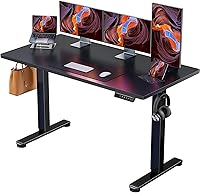
Can You Use a Monitor Arm on a Standing Desk?
Yes, you can use a monitor arm on a standing desk if the desktop supports its clamp or grommet mount and the arm matches your monitor's size, weight, and VESA pattern. Check clearance underneath the desk, then raise and lower the desk slowly to make sure cables have enough slack.
On this page (8 sections)
- Does a monitor arm work with a standing desk?
- What should you check before mounting an arm?
- How do you check a standing desk monitor arm's fit?
- How do you keep the arm stable while the desk moves?
- How should you route cables on an adjustable desk?
- Can a monitor arm leave enough room for a keyboard tray?
- When does a monitor arm make sense?
- Which standing desk monitor arm should you choose?
Yes, a standing desk monitor arm works when the desktop supports its mount and the monitor fits the arm's size, weight, and VESA limits. Check the clamp area, desk frame, and cable slack before installation.
A desk-mounted arm moves with the desktop as it rises or lowers. It can free space for a keyboard, notebook, or docking station, while letting you change screen position.
Does a monitor arm work with a standing desk?
Yes, a desk-mounted monitor arm moves with the desktop when you raise or lower the desk. The screen stays in the same position relative to the desk, though you may want to adjust the arm when switching between sitting and standing.
The mount needs a compatible desktop and enough clear space below it. The desk frame, crossbars, or control box can block installation.
For a broader view of different desk types, see our guide to standing desks for a home office. If you're choosing between a full desk and a riser, what a standing desk is and how its types differ can help you compare.
What should you check before mounting an arm?
Check the desktop, monitor, mount, and cables before you install an arm. A mismatch in any one can prevent a secure or useful setup.
- Desktop: Confirm its material and thickness suit the mount. Check for clear space underneath, away from beams, panels, or the desk frame.
- Monitor: Match its weight and screen size to the arm's range. Confirm the back has a compatible VESA pattern, often 75 x 75 mm or 100 x 100 mm.
- Mount location: Leave room for the arm to move without hitting a wall, shelf, or second screen. Keep the clamp clear of controls and hardware under the desk.
- Cables: Leave enough slack for the desk's full travel. Keep cords clear of lifting columns and other moving parts.
Measure the desktop thickness and the space below the mounting point. For ways to keep wires out of the desk's path, see standing desk cable management.
Can you clamp an arm to a standing desk?
A clamp can work if the desktop material and thickness suit the arm. It needs an accessible edge, a flat contact area, and clearance underneath for its hardware.
For example, HUANUO recommends a wooden tabletop for its FlowLift single arm and says the underside should be clear of beams or panels that could interfere with installation.
Some arms also offer a grommet mount, which uses a hole through the desktop. Check the required thickness and follow the desk maker's guidance for glass, stone, or other fragile tops.
Does a monitor arm fit every screen?
No. Check the monitor's weight, size, and VESA mounting holes against the arm's limits.
A screen outside any one limit may not attach or stay positioned as intended.
VESA refers to the spacing between the threaded mounting holes on a monitor's back. If a cover or bracket hides them, check the monitor manual before removing anything.
A large screen may need more reach or clearance than a smaller one. Compare the arm's range with your intended screen position, especially for an ultrawide or two monitors side by side.
How do you check a standing desk monitor arm's fit?
Start with the mount and monitor limits, then compare them with your measurements. These options cover single screens, two monitors, and ultrawide setups.
The ErGear Single Monitor Arm fits 13–34 in flat or curved screens up to 19.8 lb, with 75 x 75 mm or 100 x 100 mm VESA patterns. Its clamp suits desks 0.39–2.56 in thick, and its grommet base suits desks 0.39–2.95 in thick.
The Huanuo FlowLift Single Monitor Arm fits 13–32 in monitors weighing 4.4–19.8 lb, with 75 x 75 mm or 100 x 100 mm VESA patterns. It offers clamp and grommet mounting, and HUANUO recommends a wooden top with no interfering underside beams or panels.
For two screens, the Huanuo FlowLift Dual Monitor Arm supports 13–32 in monitors weighing 4.4–19.8 lb each, with 75 x 75 mm or 100 x 100 mm VESA patterns. HUANUO recommends a wooden desk 0.59–3.54 in thick with no cross beams or panels below the mounting point.
The VIVO Ultrawide Single Monitor Arm supports screens up to 22 lb with 75 x 75 mm or 100 x 100 mm VESA mounting holes. It fits most standard monitors from 13–32 in and ultrawide screens up to 38 in; its clamp fits desks up to 3.25 in thick, and an optional grommet mount is included.
How do you keep the arm stable while the desk moves?
Attach the mount to a desktop that meets its requirements and follow the arm's setup instructions. Tighten the clamp or grommet hardware as directed, then check that the base stays in place when you gently move the screen.
Before loading the monitor, confirm that the arm is assembled correctly and its VESA plate fits the screen. Keep the desktop clear around the mount so the arm can move without striking other equipment.
Raise and lower the desk slowly while watching the mount and cables. Stop if the arm shifts, the top flexes around the clamp, or a cable catches, and address the cause before continuing.
How should you route cables on an adjustable desk?
Leave a loose loop of cable between the moving desktop and any fixed outlet or equipment. The loop should cover the desk's full height range without hanging where it can snag.
Route cables along the arm if it has cable clips, then keep the rest of the path clear of lifting columns and the frame. Avoid pulling a cable tight at either sitting or standing height.
If the control box or power strip moves with the top, check that the cables still have room to travel. Our guide to standing desk cable management covers ways to organize cords around a height-adjustable frame.
Can a monitor arm leave enough room for a keyboard tray?
It can, but check how the arm, keyboard tray, and desk frame fit before you buy either mount. A tray needs room below the top, while the monitor arm's hardware may use some of the same space.
Measure from the proposed arm location to any tray rails, control box, crossbar, or lifting column. Then check the monitor's position from your normal working posture.
For help deciding whether a tray suits your setup, read standing desk with a keyboard tray: do you need one?. If you're planning a wider setup, our guide to standing desks for two monitors can help with desk-space planning.
When does a monitor arm make sense?
A monitor arm can suit a setup that needs more screen-position control or open desktop space, if the desk supports its mount. The right screen position depends on your chair, screen, and posture.
A monitor stand may be simpler if your screen is already at a comfortable height, you don't need to move it, or your desktop can't take a clamp or grommet mount. Keep the stand if it meets your needs and the extra desk space isn't worth the installation steps.
Compare standing desk accessories worth buying and choose ones that solve a real problem in your workspace.
Which standing desk monitor arm should you choose?
Choose a standing desk monitor arm by matching its size, weight, and VESA limits to your monitor, then checking the desktop thickness and clearance. The ErGear option fits screens up to 34 in; choose the dual Huanuo arm if both monitors meet its limits, or the VIVO arm for a compatible ultrawide screen up to 38 in.
Avoid mounting an arm if your desktop's material, thickness, underside clearance, or desk maker's guidance rules it out. After installation, move the desk through its full range slowly and check that the arm stays secure and the cables remain loose.
Frequently asked questions
Can you put a monitor arm on any standing desk?
No. The desktop must have a suitable edge or grommet hole, enough clear space underneath for the mount, and a material and thickness the arm allows.
Check the desk maker's guidance too, especially for glass or thin tops.
Then confirm the arm fits the monitor's weight, size, and VESA pattern.
Will a monitor arm move with a standing desk?
A desk-mounted monitor arm moves up and down with the desktop, so the screen should stay in the same position relative to you as the desk rises. Leave enough cable slack for the full travel, keep wires clear of moving parts, and test the motion slowly before normal use.
Is a monitor arm better than a monitor stand on a standing desk?
A monitor arm can free desktop space and give you more control over screen position, while a stand is simpler and needs no clamp or grommet mount. Choose based on your desk's mounting options, how often you adjust the screen, and whether the stand's height already works for you.
Can a dual monitor arm work on a standing desk?
Yes, if the desk can take the mount and both screens fall within the arm's size and weight limits. Check the combined setup for stability, confirm that the clamp clears the desk frame, and route both monitors' cables with enough slack for the desk's full height range.