Manual vs Electric Standing Desks: Which Is Better? (October 2026)
Choose a manual standing desk if you prefer a hand crank, or an electric standing desk if you want push-button changes and saved heights. Your work routine, preferred controls and choice of a complete desk or frame will narrow the options.
On this page (9 sections)
- Manual vs electric standing desk: which should you choose?
- Which height range fits your sitting and standing positions?
- How do top size and weight capacity affect the choice?
- Who should choose a manual standing desk?
- Who should choose an electric standing desk?
- What should you plan before assembly?
- How should you use and care for a manual or electric desk?
- Which VIVO desk should you choose?
- Sources for desk guidance
Choose a manual standing desk if you prefer turning a crank, or an electric standing desk if you want push-button height changes. In this manual vs electric standing desk comparison, the best fit comes down to how often you adjust, which controls you prefer and whether you need a complete desk or a frame.
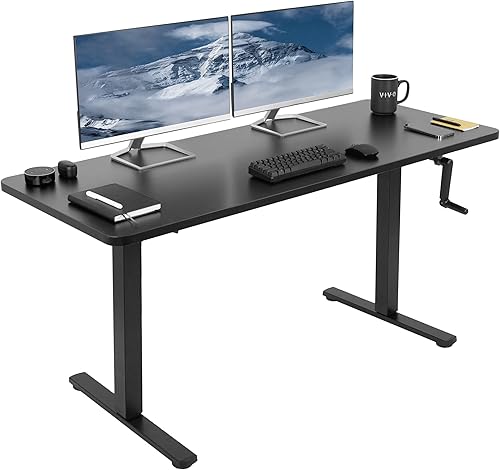
The two complete VIVO desks have one-piece tops measuring 59 x 23.6 in. One adjusts with a hand crank; the other has a motor, push-button controller and 4 memory presets.

Manual vs electric standing desk: which should you choose?
Choose manual for hand-crank control and electric for push-button adjustments. Think about your workday first: if you regularly change between sitting and standing, the ease of each adjustment matters more than a feature you might rarely use.
A crank requires you to turn a handle when raising or lowering the desk. With an electric desk, you press a button and the motor moves the desk.
Both styles can support a sit-stand routine. The right one is the desk you can adjust comfortably, that reaches your working heights and fits your equipment and room.
How often will you change desk height?
If you expect to move the desk several times a day, consider whether you’ll want to turn a crank for each change. The VIVO manual desk uses a hand crank with telescopic height adjustment.
The electric VIVO desk has 4 memory presets. Once your preferred heights are saved, you can select them by button instead of turning a handle and estimating the position.
A manual desk makes sense when you adjust less often or prefer a direct mechanical control. If you share the desk with someone who uses different heights, presets can make returning to each person’s saved position simpler.
Do you want a complete desk or a frame?
The VIVO manual and electric models both include a top. The manual VIVO frame is sold without one, so you can choose a separate tabletop that fits its dimensions.
A complete desk keeps the top and base choice together. The frame is a better fit if you already have a top you want to use or need a size within the frame’s supported range, but it adds measuring and mounting work.
If you’re comparing desk types, start with our standing desk buying guide for a home office. For more frame-only options, see our standing desk frame guide.
Which height range fits your sitting and standing positions?
The electric VIVO desk reaches higher, while the manual desk and frame start lower. Measure your comfortable seated and standing heights before choosing, because the right maximum is only useful if the desk also lowers enough for you.
The manual VIVO desk adjusts from 28.6 to 46.8 in. The electric model adjusts from 29.3 to 48.5 in.
The VIVO manual frame adjusts from 27.8 to 46.5 in. That measurement is for the frame, so include the tabletop thickness when estimating the height of the assembled desk.
How do you check your fit?
At your seated and standing positions, your elbows should stay near your sides as you type, without raised shoulders. Your screen should sit at a comfortable viewing level, so account for the height of your monitor or laptop stand too.
Our guide to choosing the right standing desk height explains how to measure both working positions. If you’re tall, compare your measurements with the desk’s maximum height and see our standing desk height guide for tall people.
A common mistake is choosing based on the desk’s highest position alone. Check the full range against both your seated and standing needs, then remember that a separate tabletop adds height to a frame.
How do top size and weight capacity affect the choice?
The two complete desks have the same top size, but their stated weight limits differ. Count the equipment that will stay on the desk, including any items attached to it, before settling on a model.
Both tops measure 59 x 23.6 in and are one-piece particle board surfaces. The manual desk supports up to 110 lb, while the electric desk supports up to 220 lb.
The manual frame supports up to 132 lb and does not include a top. Allow for the tabletop’s weight as well as your monitor, computer and accessories when considering capacity.
Measure your available floor space and the equipment footprint together. A top can fit the room but feel cramped once you place monitors, a keyboard and other regular work items on it.
If you use a monitor arm, see our guide to using a monitor arm with a standing desk. It can help you plan where the screen will sit before you commit to a desk layout.
Who should choose a manual standing desk?
Choose a manual desk if you want a complete crank desk or a frame for a tabletop you select. It suits a routine where turning a handle is acceptable and where the desk’s capacity and height range cover your needs.
The complete VIVO manual model is a straightforward choice if its included top fits your room and work setup. The frame makes more sense when you want a different tabletop size within its 34 to 72 in length and 23 to 43 in width limits.
Skip a manual model if you know that turning a handle will make you avoid changing heights. Also look elsewhere if your equipment exceeds the stated weight limit or if your standing position requires a height above the model’s maximum.
For a frame, check the tabletop dimensions and thickness before buying. Some tops require drilling, and the frame instructions recommend two people for assembly, so plan for both steps.
Who should choose an electric standing desk?
Choose an electric desk if you want motorized height changes and saved positions. The VIVO electric model fits people who value push-button control, need its higher maximum height or want its higher stated capacity.
The controller’s 4 memory presets are useful if you switch between known working heights or share the desk. They give you repeatable positions without needing to turn a handle each time.
Skip this option if you can’t place the desk near a suitable power connection or if you prefer a manual control. The desk needs power for its motor, and the cord must stay clear through the full height range.
Before setup, picture the cord at both the lowest and highest positions. Our standing desk cable management guide covers ways to keep cables organized as a desk moves.
What should you plan before assembly?
Measure the room, check the parts and read the assembly instructions before you start. A little preparation helps prevent a desk from being assembled where it cannot move freely or from being paired with a tabletop that does not fit.
For a complete desk, confirm that the top fits the room and that you have space to build the frame. Keep the work area clear enough to turn the desk upright and raise it without hitting a wall, shelf or window.
For the VIVO manual frame, check the tabletop’s length, width and thickness against the frame requirements. The frame includes hardware and instructions, and some tabletop options need drilling while another listed top size does not.
Don’t assume a tabletop will work just because it looks close in size. Measure before assembly and follow the instructions for attaching it, especially if you need to drill.
A common setup mistake is leaving power or computer cables taut at standing height. Check their slack while the desk is low and high, and move cables away from legs and telescoping parts.
How should you use and care for a manual or electric desk?
Keep the top clear of loose items while adjusting, and follow the desk instructions for assembly and care. During the first height changes, watch the space around the top and the cable path so nothing gets caught or knocked over.
On a manual desk, turn the crank with the surface clear enough that objects won’t shift as the desk moves. If you change height infrequently, still confirm that the desk reaches your desired positions when you need them.
On an electric desk, use the controller deliberately and keep the cord free to move. The memory presets can help you return to familiar heights, but check the surroundings before selecting a position.
Both complete VIVO desks have a scratch-resistant surface, but that does not make the top damage-proof. Keep sharp or rough items from dragging across it, and use care when moving equipment so its edges do not scrape the surface.
For a standing desk with wheels, compare rolling standing desks. If you only need a raised work surface at an existing desk, a standing desk converter may better match the space and setup you already have.
Which VIVO desk should you choose?
Choose the electric desk for push-button changes and presets, the manual desk for a complete crank setup, or the frame for a separate tabletop. The manual vs electric standing desk decision gets easier when you match the adjustment to your routine, then check height, capacity and available space.
Pick the electric desk if you want repeatable button-controlled heights, need up to 220 lb of stated capacity, or want the higher maximum height of these options. Pick the complete manual desk if you want a similar size top and are comfortable adjusting it by hand.
Choose the frame if you want to provide your own tabletop and its dimensions fit the frame. If none of these desk types matches your space, our standing desk setup guide can help you plan the workstation around what you already own.
Sources for desk guidance
OSHA’s computer workstation guidance offers general advice on arranging a workstation. Use it alongside the assembly and use instructions for your desk.
The U.S. Consumer Product Safety Commission’s furniture tip-over information explains furniture anchoring and tip-over hazards.
Follow the desk instructions and keep children from climbing on furniture.
Frequently asked questions
Is a manual or electric standing desk better?
A manual desk suits you if turning a hand crank fits your routine, while an electric desk suits you if you want push-button height changes. Compare the height ranges, weight limits, top size and controls for the exact desks you are considering.
Are hand-crank standing desks hard to adjust?
A hand-crank desk requires you to turn the handle to raise or lower it, so adjustment takes a physical step each time. How much effort that takes depends on the desk and its load; VIVO describes its crank as simple to use.
Does a manual standing desk need electricity?
A hand-crank desk adjusts manually and does not use a motor for height changes. An electric desk needs power to operate its motor and controller, so plan for an outlet and a cable path that stays clear as the desk moves.
Can I use my own tabletop with a crank desk frame?
Yes, the VIVO manual frame is designed for a separate tabletop from 34 to 72 in long and 23 to 43 in wide, with a thickness of at least 3/4 in. Check the top's fit and mounting requirements before assembly.
Which standing desk is easier to set up?
A complete desk includes its top and frame, while a frame-only option requires a separate tabletop and may require drilling. Both types need assembly, so check the assembly instructions and measure your workspace before choosing.


